Manage Deployments
After you deploy a Bento on BentoCloud, you can easily manage them using the console, BentoML CLI or API. Available operations include viewing, updating, applying, terminating, and deleting Deployments.
View
To list all Deployments in your BentoCloud account:
bentoml deployment list
Expected output:
Deployment                                         created_at           Bento                                                                      Status      Region
sentence-transformers-f8ng                         2024-02-20 17:11:29  sentence_transformers:zf6jipgbyom3denz                                     running     google-cloud-us-central-1
mistralai-mistral-7-b-instruct-v-0-2-service-cld5  2024-02-20 16:40:16  mistralai--mistral-7b-instruct-v0.2-service:2024-02-03                     running     google-cloud-us-central-1
summarization                                      2024-02-20 09:27:52  summarization:ghfvclwp2kwm5e56                                             running     aws-ca-1
control-net-gtb6                                   2024-02-20 01:53:29  control_net:cpvweqwbsgjswpmu                                               terminated  google-cloud-us-central-1
latent-consistency-4hno                            2024-02-19 03:02:34  latent_consistency:p3ltylgo2kxbwv6m                                        terminated  google-cloud-us-central-1
To retrieve details about a specific Deployment:
Choose one of the following commands as needed.
bentoml deployment get <deployment-name>

# To output the details in JSON
bentoml deployment get <deployment-name> -o json

# To output the details in YAML (Default)
bentoml deployment get <deployment-name> -o yaml
Expected output in YAML:
name: summarization
bento: summarization:ghfvclwp2kwm5e56
cluster: aws-ca-1
endpoint_urls:
- https://summarization-test--aws-ca-1.mt1.bentoml.ai
admin_console: https://test.cloud.bentoml.com/deployments/summarization/access?cluster=aws-ca-1&namespace=test--aws-ca-1
created_at: '2024-02-20 09:27:52'
created_by: bentoml-user
config:
  envs: []
  services:
    Summarization:
      instance_type: cpu.2
      scaling:
        min_replicas: 1
        max_replicas: 2
      envs: []
      deployment_strategy: Recreate
      extras: {}
      config_overrides:
        traffic:
          timeout: 10
status:
  status: running
  created_at: '2024-02-20 09:27:52'
  updated_at: '2024-02-21 05:46:18'
To get detailed information about a Deployment:
import bentoml

dep = bentoml.deployment.get(name="deploy-1")
print(dep.to_dict())  # To output the details in JSON
print(dep.to_yaml())  # To output the details in YAML
Expected output in JSON:
{
 "name": "deploy-1",
 "bento": "summarization:5vsa3ywqsoefgl7l",
 "cluster": "aws-ca-1",
 "endpoint_urls": [
   "https://deploy-1-test--aws-ca-1.mt1.bentoml.ai"
 ],
 "admin_console": "https://test.cloud.bentoml.com/deployments/deploy-1/access?cluster=aws-ca-1&namespace=test--aws-ca-1",
 "created_at": "2024-03-01 05:00:19",
 "created_by": "bentoml-user",
 "config": {
   "envs": [],
   "services": {
     "Summarization": {
       "instance_type": "cpu.2",
       "scaling": {
         "min_replicas": 1,
         "max_replicas": 1
       },
       "envs": [],
       "deployment_strategy": "Recreate",
       "extras": {},
       "config_overrides": {
         "traffic": {
           "timeout": 10
         }
       }
     }
   }
 },
 "status": {
   "status": "running",
   "created_at": "2024-03-01 05:00:19",
   "updated_at": "2024-03-06 06:22:53"
  }
}
To check the Deployment’s status:
import bentoml

dep = bentoml.deployment.get(name="deploy-1")
status = dep.get_status()
print(status.to_dict()) # Show the current status of the Deployment
# Output: {'status': 'running', 'created_at': '2024-03-01 05:00:19', 'updated_at': '2024-03-06 03:55:17'}
get_status() has a parameter refetch to automatically refresh the status, which defaults to True. You can use dep.get_status(refetch=False) to disable it.
To get the Deployment’s Bento:
import bentoml

dep = bentoml.deployment.get(name="deploy-1")
bento = dep.get_bento()
print(bento) # Show the Bento of the Deployment
# Output: summarization:5vsa3ywqsoefgl7l
get_bento() has a parameter refetch to automatically refresh the Bento information, which defaults to True. You can use dep.get_bento(refetch=False) to disable it.
To retrieve configuration details:
import bentoml

dep = bentoml.deployment.get(name="deploy-1")
config = dep.get_config()
print(config.to_dict()) # Show the Deployment's configuration details in JSON
print(config.to_yaml()) # Show the Deployment's configuration details in YAML
Note
The output is the same as the config value in the example output above.
get_config() has a parameter refetch to automatically refresh the configuration data, which defaults to True. You can use dep.get_config(refetch=False) to disable it.
Update
Updating a Deployment is essentially a patch operation. This means that when you execute an update command, it only modifies the specific fields that are explicitly included in the update command. All other existing fields and configurations of the Deployment remain unchanged. This is useful for making incremental changes to a Deployment without needing to redefine the entire configuration.
To update specific parameters of a single-Service Deployment:
# Add the parameter name flag
bentoml deployment update <deployment-name> --scaling-min 1
bentoml deployment update <deployment-name> --scaling-max 5
import bentoml

bentoml.deployment.update(
  name = "deployment-1",
  scaling_min=1,
  scaling_max=3
  # No change to unspecified parameters
)
You can also update Deployment configurations using a separate file (only add the fields you want to change in the file). This is useful when you have multiple BentoML Services in a Deployment.
bentoml deployment update <deployment-name> -f patch.yaml
import bentoml

bentoml.deployment.update(name="deployment-1", config_file="patch.yaml")
To roll out a Deployment:
# Use the Bento name
bentoml deployment update <deployment-name> --bento bento_name:version

# Use the project directory
bentoml deployment update <deployment-name> --bento ./project/directory
import bentoml

# Use the Bento name
bentoml.deployment.update(name="deployment-1", bento="bento_name:version")

# Use the project directory
bentoml.deployment.update(name="deployment-1", bento="./project/directory")
Apply
The apply operation is a comprehensive way to manage Deployments, allowing you to create or update a Deployment based on the specifications provided. It works in the following ways:
If a Deployment with the given name does not exist,
applywill create a new Deployment based on the specifications provided.If a Deployment with the specified name already exists,
applywill update the existing Deployment to match the provided specifications exactly.
The differences between apply and update:
Update (Patch-only): Makes minimal changes, only updating what you specify.
Apply (Overriding): Considers the entire configuration and may reset unspecified fields to their default values or remove them if they’re not present in the applied configuration. If a Deployment does not exist, applying the configuration will create the Deployment.
To apply new configurations to a Deployment, you define them in a separate file as reference.
bentoml deployment apply <deployment_name> -f new_deployment.yaml
import bentoml

bentoml.deployment.apply(name = "deployment-1", config_file = "deployment.yaml")
Roll back
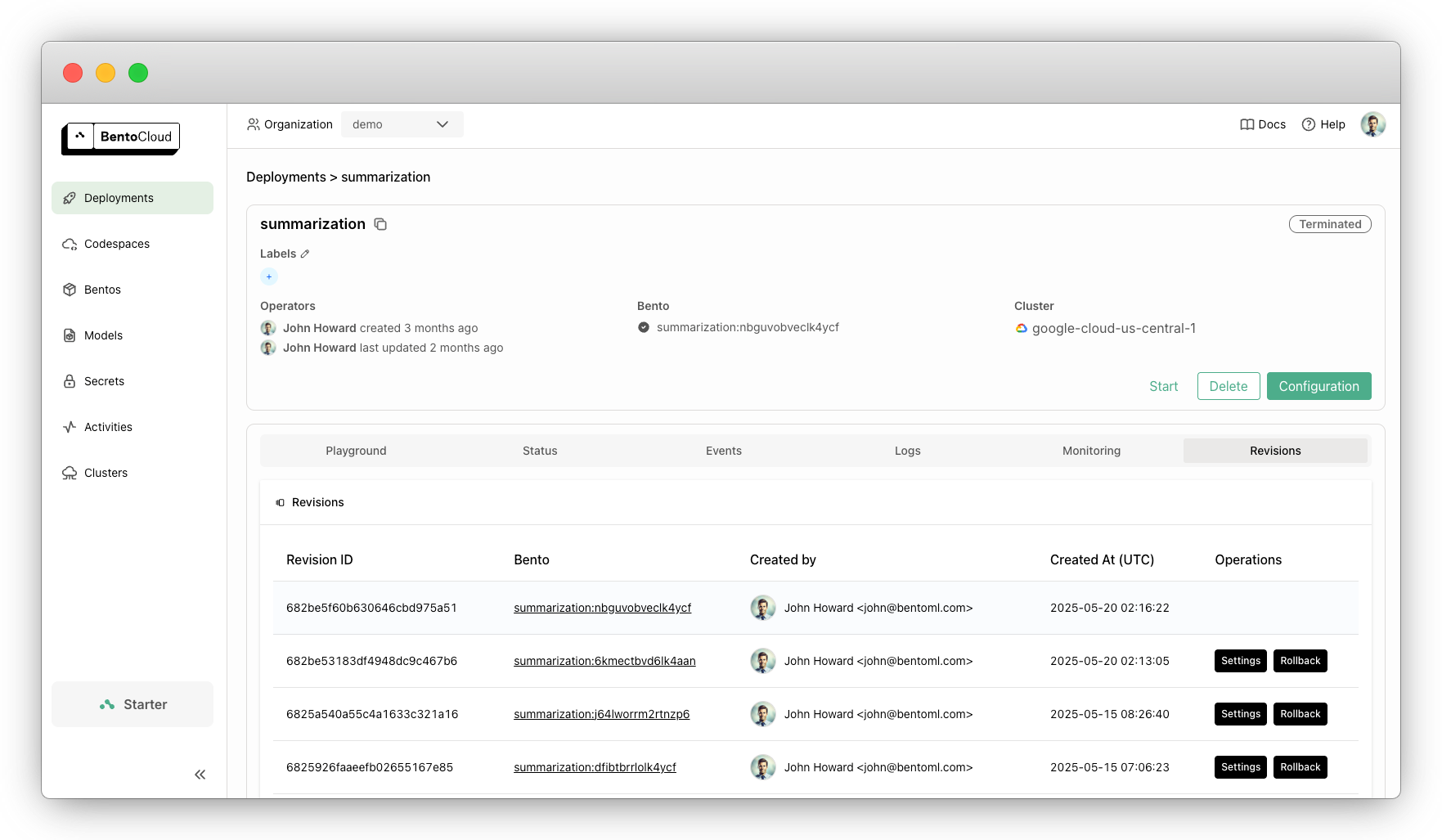
BentoCloud keeps track of all Deployment revisions, allowing you to easily roll back to previous versions and recover from issues or revert unwanted changes.
To revert your Deployment to a previous state:
Navigate to the Deployments page on the BentoCloud console.
Select your Deployment.
On the Revisions tab, locate the revision you want to roll back to.
Click the Rollback button next to that revision and confirm the rollback action. You can view the configurations of a previous version by clicking Settings.
Note
Rolling back does not delete any revisions. You can always roll forward or back to any available revision as needed.
Terminate
Terminating a Deployment means it will be stopped so that it does not incur any cost. You can still restore a Deployment after it is terminated.
To terminate a Deployment:
bentoml deployment terminate <deployment_name>
import bentoml

bentoml.deployment.terminate(name="deployment-1")
Delete
You can delete a Deployment if you no longer need it. To delete a Deployment:
bentoml deployment delete <deployment_name>
import bentoml

bentoml.deployment.delete(name="deployment-1")
Warning
Exercise caution when deleting a Deployment. This action is irreversible.